Introduction
We all are heard about POM (Page Object Model). This article will give you an introduction to "Page Factory" and its implementation in Selenium using java.Page Factory is an inbuilt page object model concept for Selenium WebDriver but it is very optimized.
Background
Page Factory can be used in any kind of framework such as Data Driven, Modular or Keyword Driven. PageFactory gives more focus on how the code is being structured to get the best benefit out of it.Advantages of Page Factory
- Whenever we use a WebElement it will go and find it again so you shouldn’t see StaleElementException’s
- On PageFactory Initialization the proxies are configured, but the WebElements are not found that point. So we won’t get NoSuchElementException.
Architecture
There are different component on which any Framework structure is depend on, here we will see Page Factoryautomation architecture in detail.Architecure Design :

Architecture Component :
Test Class --
In Test Class we will write a actual selenium test script. Here we call Page Action and mentioned actions to be performed on Web Pages. For each page we can write our own test class for better code readability. We can write test cases in @Test annotation.
Page Action Class --
In Page Action Class, we can write all web pages action as per the pages and functionality. Under Page Action component, for each page in the application we have corresponding Page class.Page Action class will call Page Factory class, page Factory returns WebElmenet of the web page and Pageaction class has Page Method which perform action on those WebElement.
Its very easy to jump on other Page Action class to call any reusable Page Action Method.
Page Factory Class --
Page Factory class is nothing but Object Repository in other term. For each web page it has its own Page Object Definations. Each web element should be uniquely gets identified and should be defined at class level. we will useFindBy annotation and will define web element. so that we can able to perform actions on them.Reports/DB Connection Class --
Here We can write our own business layers, Report Structure, DBConnection etc. This Component is called mostly from Page Action class under Page Action Method.Environment Required:
- Java
- Eclipse IDE
- Selenium Webdriver
- TestNG
Selenium WebDriver -- Selenium is open source testing framework. Selenium WebDriver supports most of programming languages like c#, java, perl, Python etc.
TestNG -- It is testing framework inspired from Junit. We have extended new annotation in TestNG.
Framework
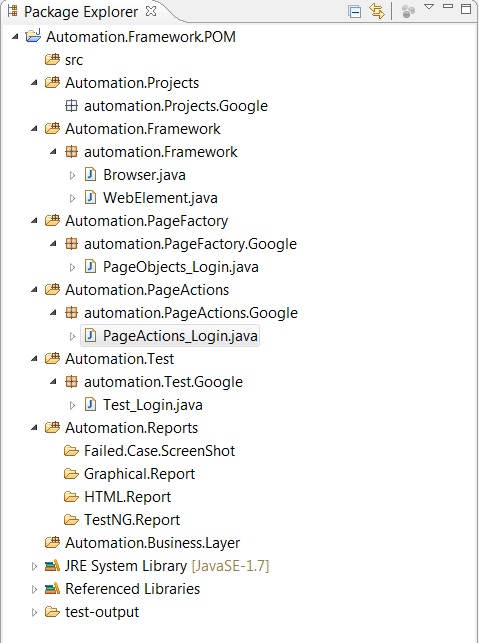
Framework Structure in Detail :
Automation Projects :
Suppose we are working on multiple Projects/Modules and there is a requirement to automate those modules then In this Source Folder we have different Projects/Modules listed.With this it is easy to make your own Test Suites for specific Project/Modules. We can write our own initialization script to load all component related to any specific Modules/Project. In above you are seenAutomation.Project.Google for Google/Gmail project. You can add your own projects here.
Automation Framework :
In Automation Framework source folder, we add Browser, WebElement, Component Functions and other common function that we use later on in our Framework.Automation Page Factory :
Automation Page Factory source folder, where we have all Object repository as per modules/Projects. In above example you can see PageObject.Login.java for Google project. We can define more page Objects for each webpage under Google project.Here is code snippet how we define Page Factory
Hide Copy Code
   package automation.PageFactory.Google;
   import org.openqa.selenium.WebDriver;
   import org.openqa.selenium.WebElement;
   import org.openqa.selenium.support.FindBy;
   import org.openqa.selenium.support.PageFactory;
   public class PageObjects_Login
   {
       Code Here
   }
To write Page Factory code we need to import org.openqa.selenium.support.PageFactory; which allows us to use implementation of Page Factory.You can initialize the elements within the constructor of the PageObject (PO) by taking advantage of the "this" keyword to refer to the current class instance, like so:
Hide Copy Code
   import org.openqa.selenium.support.PageFactory;
   public PageObjects_Login(WebDriver driver)
   {
       this.driver = driver;
       //This initElements method will create all WebElements
       PageFactory.initElements(driver, this);
   }
Additionally with the help of PageFactory class we use annotations @FindBy to find WebElement. @FindBy can accept partialLinkText , name , xpath , tagName, id, linkText , css, className, as attributes.Here is the code snippet for @FindBy
Hide Copy Code
   @FindBy(xpath=".//*[@id='Email']")
    public WebElement gmailUserIDWebEdit;

    @FindBy(id="next")
    public WebElement gmailNextButton;

    @FindBy(id="Passwd")
    public WebElement gmailPasswordWebEdit;
Always use meaningful name for any WebElements.Automation Page Action
Page Action where we have all our Page Factory calls and Page Action Methods. We have separate page action for each web Page which is use for code reusability.Here we call respective Page Factory WebElements with creating instance to a Page Factory class
Hide Copy Code
    package automation.PageActions.Google;
    import java.util.NoSuchElementException;

    import automation.PageFactory.Google.PageObjects_Login;
    import org.openqa.selenium.WebDriver;

    public class PageActions_Login
    {
     WebDriver driver;
     PageObjects_Login po; // Create Instance to Page Factory class
     public PageActions_Login(WebDriver driver)
     {
      this.driver = driver; // set webDriver for current Page Action
     }
 }
In Above code snippet in the Page Action class constructor, we set WebDriver for current Page Action.We can write our custom Page Action method to perform action on Web Elements.
Below is snippet For entering UserID on gmail site.
Hide Copy Code
    public void enterPassword(String searchText){
  po = new PageObjects_Login(driver);
  if (po.gmailPasswordWebEdit != null){
   try
   {
    po.gmailPasswordWebEdit.sendKeys(searchText);
   } catch (NoSuchElementException e) {
    // TODO Auto-generated catch block
    System.out.println("Exception message"+ e.getMessage());
   }
  }
 }
Automation Test
In the Automation Test source folder we have Test class with TestNG test cases.Here we create Instance to Page Action and call Page Action Method. We just pass WebDriver instance to PageAction.
Hide Copy Code
    public class Test_Login {

 WebDriver driver;
 PageActions_Login actionLogin;

 @BeforeTest
 public void setup(){
  driver = new FirefoxDriver();
  driver.manage().timeouts().implicitlyWait(10, TimeUnit.SECONDS);
  driver.get("http://gmail.com/");
 }
  @Test (priority =0)// Try to sign with Invalid Password
  public void SignIntoGMailInvalidPassword() {
   actionLogin = new PageActions_Login(driver);
   actionLogin.enterUserIDPassword("upadhyay40","xyz");
   String loginPageTitle = actionLogin.getWrongPasswordTextMessage();
   Assert.assertTrue(loginPageTitle.contains("The email and password you entered don't match."));
  }
In this we use @Test annotation to create TestNG test cases, we call Page Action Method from test method.Automation Report
Here we wrote our custom report for better understanding after our test run.In failed case Screenshot, after any test case failed it write a result with screen shot.
In Graphical report, we can use ReportNG, Velocity and guice plugin with TestNG.
Implementations of the ITestListener interface are designed for real-time reporting, while implementations of the IReporter interface are intended to generate reports after the suite run is finished.
Implementing an instance of IReporter and the generateReport(List<ISuite> suites, String outputDirectory) method should allow you to look at the test results and create an HTML report.
Automation Business Layer
All the main logical operations are processed in the Automation Business layer. Coordinating the input from the user interface and the data from the database, a Automation Business layer assumes its importance in any software application.Download code
FrameWork.zipPoints of Interest
Develop a QA testing framework.Author
Mahesh Upadhyay,
Technical Consultant, ADP India Pvt Ltd

No comments:
Post a Comment